Report · example
Audit fixture
file:///probe/test-pages/pages/audit.html
- Chromium 156.0.8078.4
- 1280×720 CSS pixels
- Light scheme
- Probe dev
An automated scan can't show a page is accessible. It shows what was measured.
Overview
Probe found 7 failures in what it measured. 2 findings need a person to judge, and 1 piece of text wasn't tested, with its reason.
And 54 of the 86 WCAG 2.2 criteria can only be checked by a person.
- 7 Failed Below the level required
- 2 Needs a human Automation couldn't decide
- 1 Not tested Skipped, each with a reason
- 54 Criteria for a person Only a person can test them
Your decisions on this page: of 2 items that need a human, 0 decided and 2 open. 0 failures dismissed by your decisions, still counted in Failed and listed with your note.
At a glance
Counts of what this scan measured, drawn from the report. They are not a grade.
What was measured
findings in all
- Failed
- Needs a human
- Not tested
Counts, not a grade. Needs a human and Not tested are as much a part of the result as Failed.
What each count is made of
- Failed: 7 pieces of text below the contrast required, 0 elements failing an axe-core rule, and 0 elements failing a keyboard or voice control check.
- Needs a human: 2 pieces of text whose contrast a person must judge, 0 elements axe-core couldn’t decide, and 0 elements the keyboard and voice control checks leave to a person.
- Not tested: 1 piece of text the contrast check skipped, each with a reason.
1 more piece of text was measured below the contrast required but exempt, such as text in a disabled control.
Table: What was measured
| Result | Findings |
|---|---|
| Failed | 7 |
| Needs a human | 2 |
| Not tested | 1 |
Failures by WCAG level
Each failure counts once, at the lowest level it falls short of. Text below the AA contrast counts at AA, even though it also misses AAA.
Table: Failures by WCAG level
| Level | Failures |
|---|---|
| Level A | 0 |
| Level AA | 6 |
| Level AAA | 1 |
Coverage of WCAG 2.2 criteria
Of 86 criteria at levels A, AA and AAA. 1 obsolete criterion is left out. Not checked means only a person can test it. The coverage table lists each one.
Table: Coverage of WCAG 2.2 criteria
| Status | Criteria |
|---|---|
| Checked | 2 |
| Partly checked | 30 |
| Not checked: needs a person | 54 |
Fixes that clear the most failures
Most failures cleared first. What to fix first lists every fix in Probe’s order, level A first, with the CSS to copy. 1 group of failures has no one change that clears it: see What to fix first.
Table: Fixes that clear the most failures
| Fix | Level | Failures it clears |
|---|---|---|
| Darken grey text #777777 to #707070 (AA) | AA | 3 |
| Darken red text #ff0000 to #ee0000 (AA) or #b60000 (AAA) | AA | 1 |
| Darken grey text #999999 to #767676 (AA) or #595959 (AAA) | AA | 1 |
| Darken grey text #5a5a5a to #595959 (AAA) | AAA | 1 |
Failures by WCAG principle
The principle is the first number of the WCAG criterion. A failure listed against more than one criterion counts once, under its first: one listed against 2.4.4 and 4.1.2 counts under Operable.
Table: Failures by WCAG principle
| Principle | Failures |
|---|---|
| 1. Perceivable | 7 |
| 2. Operable | 0 |
| 3. Understandable | 0 |
| 4. Robust | 0 |
How the page was scanned
- Address
- file:///probe/test-pages/pages/audit.html
- Browser
- Chromium 156.0.8078.4
- Window size
- 1280 by 720 CSS pixels
- Colour scheme
- Light was asked for, and the page saw it.
- Waited for
- load event, a scroll to the bottom and back, and animations finishing
- Settling
- The page fitted in the window, so there was nothing to scroll.
- Not looked inside
- No frames or shadow roots were found.
- Other rules
- axe-core 4.14.1, 65 rules run.
- Screenshot
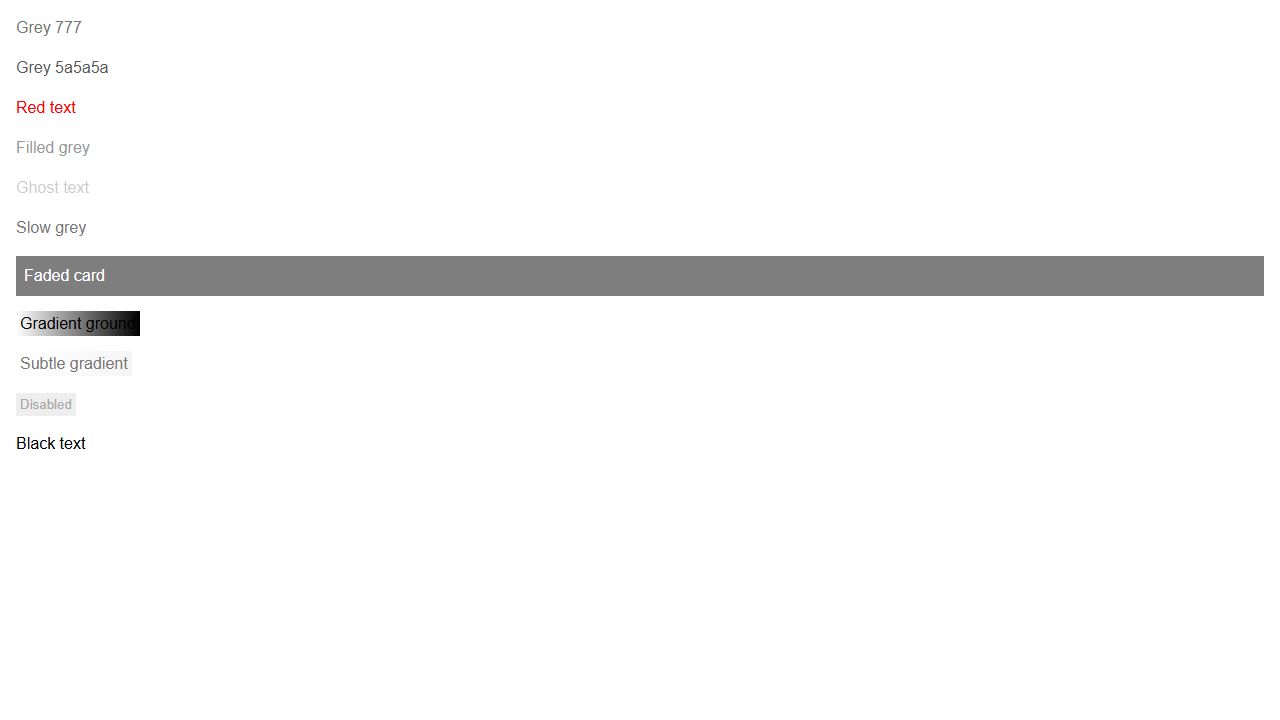
- audit.jpg, 1280 by 720 pixels.
Your decisions
Record a decision on any failed or needs-a-human finding from its details (open it from the Failed or Needs a human tab), with a note saying why. Probe doesn’t make these decisions or check them: they are yours. Download them as probe-decisions.json and commit it to your site’s repository, so git records who decided what and when. A failure marked false positive or not applicable is still listed, with your note.
No decisions file is open. To see and change the decisions already made, open probe-decisions.json with the reports. No changes made in this browser yet.
What to fix first
5 fixes, level A first, then the most failures each clears. Every colour was measured again in the page before it’s shown.
Darken grey text #777777 to #707070 (AA) Level AA
color: #707070;No shared AAA colour. A shared colour was computed, but it didn't reach the level on every item when Probe measured it again in the page, so it isn't shown. Each item's own fix is listed under Findings.
Colours and ratios
Now: 4.47:1 Text grey (#777777) on white (#ffffff)AA fix Text grey (#707070) on white (#ffffff)Now: 4.10:1 Text grey (#777777) on very light grey (#f5f5f5)AA fix Text grey (#707070) on very light grey (#f5f5f5)AA: Verified: applied to all 3 together and measured again in the page, the lowest contrast was 4.54:1.
See the 3 pieces of text
Which 3 pieces of text: each opens its finding.
- paragraph “Grey 777”
html > body > p:nth-of-type(1) - paragraph “Slow grey”
html > body > p:nth-of-type(6) - text “Subtle gradient”
html > body > p:nth-of-type(8) > span
- paragraph “Grey 777”
Darken red text #ff0000 to #ee0000 (AA) or #b60000 (AAA) Level AA
color: #ee0000;color: #b60000;Colours and ratios
Now: 3.99:1 Text red (#ff0000) on white (#ffffff)AA fix Text red (#ee0000) on white (#ffffff)AAA fix Text dark red (#b60000) on white (#ffffff)AA: Verified: applied and measured again in the page, the contrast was 4.53:1.
AAA: Verified: applied and measured again in the page, the contrast was 7.02:1.
Darken grey text #999999 to #767676 (AA) or #595959 (AAA) Level AA
color: #767676;color: #595959;Colours and ratios
Now: 2.84:1 Text grey (#999999) on white (#ffffff)AA fix Text grey (#767676) on white (#ffffff)AAA fix Text dark grey (#595959) on white (#ffffff)AA: Verified: applied and measured again in the page, the contrast was 4.54:1.
AAA: Verified: applied and measured again in the page, the contrast was 7.00:1.
Black text #000000 at opacity 0.20: no single replacement colour Level AA
No shared AA or AAA colour. At least one of these can't reach this level with any text colour at its opacity: its background or opacity has to change.
Colours and ratios
Now: 1.60:1 Text black (#000000) at opacity 0.20, mostly see-through on white (#ffffff)Darken grey text #5a5a5a to #595959 (AAA) Level AAA
color: #595959;Colours and ratios
Now: 6.89:1 Text dark grey (#5a5a5a) on white (#ffffff)AAA fix Text dark grey (#595959) on white (#ffffff)AAA: Verified: applied and measured again in the page, the contrast was 7.00:1.
Failed
Failed: showing all 7.
Failed (7)
- “Grey 777”Paragraph · text contrast4.47:1needs 4.5:1 (1.4.3)Level AA
Element: paragraph “Grey 777”
Show code
Selector:
html > body > p:nth-of-type(1)Some text is too close in colour to what is behind it, so it is hard to read.
The contrast is 4.47:1. For text of this size, WCAG asks for at least 4.5:1 at AA (1.4.3) and 7:1 at AAA (1.4.6).
Text grey (#777777) on background white (#ffffff) (the worst pixel behind it).
- AA fix:
color: #767676;reaches 4.54:1. - AAA fix:
color: #595959;reaches 7.00:1.
Screenshot taken after measuring, with the element outlined. - AA fix:
- “Grey 5a5a5a”Paragraph · text contrast6.89:1needs 7:1 (1.4.6)Level AAA
Element: paragraph “Grey 5a5a5a”
Show code
Selector:
html > body > p:nth-of-type(2)Some text is too close in colour to what is behind it, so it is hard to read.
The contrast is 6.89:1. For text of this size, WCAG asks for at least 7:1 at AAA (1.4.6).
Text dark grey (#5a5a5a) on background white (#ffffff) (the worst pixel behind it).
- AAA fix:
color: #595959;reaches 7.00:1.
Screenshot taken after measuring, with the element outlined. - AAA fix:
- “Red text”Paragraph · text contrast3.99:1needs 4.5:1 (1.4.3)Level AA
Element: paragraph “Red text”
Show code
Selector:
html > body > p:nth-of-type(3)Some text is too close in colour to what is behind it, so it is hard to read.
The contrast is 3.99:1. For text of this size, WCAG asks for at least 4.5:1 at AA (1.4.3) and 7:1 at AAA (1.4.6).
Text red (#ff0000) on background white (#ffffff) (the worst pixel behind it).
- AA fix:
color: #ee0000;reaches 4.53:1. - AAA fix:
color: #b60000;reaches 7.02:1.
Screenshot taken after measuring, with the element outlined. - AA fix:
- “Filled grey”Paragraph · text contrast2.84:1needs 4.5:1 (1.4.3)Level AA
Element: paragraph “Filled grey”
Show code
Selector:
html > body > p:nth-of-type(4)Some text is too close in colour to what is behind it, so it is hard to read.
The contrast is 2.84:1. For text of this size, WCAG asks for at least 4.5:1 at AA (1.4.3) and 7:1 at AAA (1.4.6).
Text grey (#999999) on background white (#ffffff) (the worst pixel behind it).
- AA fix:
-webkit-text-fill-color: #767676;reaches 4.54:1. - AAA fix:
-webkit-text-fill-color: #595959;reaches 7.00:1.
Screenshot taken after measuring, with the element outlined. - AA fix:
- “Ghost text”Paragraph · text contrast1.60:1needs 4.5:1 (1.4.3)Level AA
Element: paragraph “Ghost text”
Show code
Selector:
html > body > p:nth-of-type(5)Some text is too close in colour to what is behind it, so it is hard to read.
The contrast is 1.60:1. For text of this size, WCAG asks for at least 4.5:1 at AA (1.4.3) and 7:1 at AAA (1.4.6).
Text black (#000000) at opacity 0.20, mostly see-through on background white (#ffffff) (the worst pixel behind it).
Screenshot taken after measuring, with the element outlined. - “Slow grey”Paragraph · text contrast4.47:1needs 4.5:1 (1.4.3)Level AA
Element: paragraph “Slow grey”
Show code
Selector:
html > body > p:nth-of-type(6)Some text is too close in colour to what is behind it, so it is hard to read.
The contrast is 4.47:1. For text of this size, WCAG asks for at least 4.5:1 at AA (1.4.3) and 7:1 at AAA (1.4.6).
Text grey (#777777) on background white (#ffffff) (the worst pixel behind it).
Screenshot taken after measuring, with the element outlined. - “Subtle gradient”Text · text contrast4.10:1needs 4.5:1 (1.4.3)Level AA
Element: text “Subtle gradient”
Show code
Selector:
html > body > p:nth-of-type(8) > spanSome text is too close in colour to what is behind it, so it is hard to read.
The contrast is 4.10:1. For text of this size, WCAG asks for at least 4.5:1 at AA (1.4.3) and 7:1 at AAA (1.4.6).
Text grey (#777777) on background very light grey (#f5f5f5) (the worst pixel behind it).
- AA fix:
color: #707070;reaches 4.54:1. - AAA fix:
color: #535353;reaches 7.05:1.
Screenshot taken after measuring, with the element outlined, shown enlarged. - AA fix:
Measured, but not required (1)
Text measured below the contrast WCAG asks for, where WCAG doesn’t require it, such as text in a disabled control.
- “Disabled”Button · text contrast2.00:1not required hereLevel AA
Element: button “Disabled”
Show code
Selector:
html > body > buttonSome text is too close in colour to what is behind it, so it is hard to read.
Measured at 2.00:1, but WCAG doesn't require contrast here: it is text in a disabled control.
Text grey (#aaaaaa) on background very light grey (#eeeeee) (the worst pixel behind it).
Screenshot taken after measuring, with the element outlined, shown enlarged.
Needs a human (2)
- “Faded card”Paragraph · contrast for a person2.19:1 to 2.19:1a person decidesLevel AA
Element: paragraph “Faded card”
Show code
Selector:
html > body > div:nth-of-type(1) > pSome text is too close in colour to what is behind it, so it is hard to read.
A see-through parent element also paints a background behind this text, so the measured 2.19:1 is an approximation. A person needs to check it by eye or with a colour picker.
Text white (#ffffff) at opacity 0.50, about half see-through on background grey (#7e7e7e) at the worst pixel: 2.19:1 there, 2.19:1 at the best; required 4.5:1 (AA), 7:1 (AAA).
Screenshot taken after measuring, with the element outlined. - “Gradient ground”Text · contrast for a person1.05:1 to 19.43:1a person decidesLevel AA
Element: text “Gradient ground”
Show code
Selector:
html > body > p:nth-of-type(7) > spanSome text is too close in colour to what is behind it, so it is hard to read.
The background changes behind this text (a gradient, an image or something overlapping). Against the worst pixel the contrast is 1.05:1; against the best, 19.43:1. A person needs to judge whether the text can be read where it matters.
Text black (#000000) on background black (#090909) at the worst pixel: 1.05:1 there, 19.43:1 at the best; required 4.5:1 (AA), 7:1 (AAA).
Screenshot taken after measuring, with the element outlined, shown enlarged.
Not tested (1)
Text the contrast check found but didn’t measure, grouped by why. None of it was checked, so none of it is counted as failed or as fine.
Hidden (1 item)
Hidden with display: none or visibility: hidden, or inside something that is. Nothing is drawn on screen, so there is no contrast to measure. If it appears later (a menu or a dialog), a person should check it when it is open.
- paragraph “Hidden”
html > body > div:nth-of-type(2) > p
Keyboard: the order Tab takes
Probe pressed Tab from the top of the page and reached nothing: no link, button or field took focus.
Each stop is numbered in the order Tab reached it. Probe photographed each one with focus and without, to see what focus changed, and checked nothing covered it. Whether the order makes sense is for a person to judge (WCAG 2.4.3).
- Keyboard: 0 failures, 0 items for a person
- Voice control: 0 failures, 0 items for a person
These checks press keys and read the names Chromium gives assistive technology. They aren’t a screen reader or voice control run: they measure what those rely on.
Coverage: what automated checks reached
2 checked · 30 partly checked · 54 only a person can test · 4.1.1 is obsolete
Automated checks looked at 32 of 86 WCAG 2.2 criteria at least in part. The other 54 need a person.
Even where a criterion is checked, the note says what a person still needs to look at. A criterion with no findings here hasn’t been shown to be met: it means automated checks found nothing to report. 4.1.1 is obsolete in WCAG 2.2, so there is nothing to check.
- Checked
- Checked by automation, with a person still checking what the note says.
- Partly checked
- Partly checked: automation finds some problems, and a person must still test it.
- Not checked: needs a person
- Not checked: needs a person.
- Obsolete
- Obsolete in WCAG 2.2: nothing to check.
Showing all 87 criteria.
| Criterion | Level | Status | What a person checks | Rules that ran | Findings on this page |
|---|---|---|---|---|---|
| 1.1.1 Non-text Content | A | Partly checked | Automation finds images and controls with no text alternative; a person must judge whether each alternative is accurate and useful, and whether decorative images are hidden. |
| No findings |
| 1.2.1 Audio-only and Video-only (Prerecorded) | A | Not checked: needs a person | A person must check that recorded audio has a transcript and silent video has a text or audio alternative. | None | Not checked by automation |
| 1.2.2 Captions (Prerecorded) | A | Partly checked | Automation finds video elements with no caption track; a person must check that captions exist for embedded players and are accurate and in sync. |
| No findings |
| 1.2.3 Audio Description or Media Alternative (Prerecorded) | A | Not checked: needs a person | A person must check that video has audio description or a full text alternative. | None | Not checked by automation |
| 1.2.4 Captions (Live) | AA | Not checked: needs a person | A person must check that live audio and video has captions. | None | Not checked by automation |
| 1.2.5 Audio Description (Prerecorded) | AA | Not checked: needs a person | A person must check that recorded video has audio description of what is shown. | None | Not checked by automation |
| 1.2.6 Sign Language (Prerecorded) | AAA | Not checked: needs a person | A person must check that recorded video with sound has sign language interpretation. | None | Not checked by automation |
| 1.2.7 Extended Audio Description (Prerecorded) | AAA | Not checked: needs a person | A person must check that video pauses for extended description where ordinary gaps are too short. | None | Not checked by automation |
| 1.2.8 Media Alternative (Prerecorded) | AAA | Not checked: needs a person | A person must check that recorded video has a full text alternative. | None | Not checked by automation |
| 1.2.9 Audio-only (Live) | AAA | Not checked: needs a person | A person must check that live audio has a text alternative, such as live captions. | None | Not checked by automation |
| 1.3.1 Info and Relationships | A | Partly checked | Automation finds broken lists, tables and ARIA structures; a person must check that headings, groups, tables and form labels in the markup match what the page shows. |
| No findings |
| 1.3.2 Meaningful Sequence | A | Not checked: needs a person | A person must check that the reading order in the markup makes sense when read aloud or without styles. | None | Not checked by automation |
| 1.3.3 Sensory Characteristics | A | Not checked: needs a person | A person must check that instructions do not rely only on shape, size, position or sound. | None | Not checked by automation |
| 1.3.4 Orientation | AA | Not checked: needs a person | A person must check that the page works in both portrait and landscape. | None | Not checked by automation |
| 1.3.5 Identify Input Purpose | AA | Partly checked | Automation finds autocomplete values browsers do not recognise; a person must check that fields asking for personal details have the right autocomplete value. |
| No findings |
| 1.3.6 Identify Purpose | AAA | Not checked: needs a person | A person must check that the purpose of regions, icons and controls is marked up so it can be read by software. | None | Not checked by automation |
| 1.4.1 Use of Color | A | Partly checked | Automation finds links in text marked only by colour; a person must check charts, form errors, states and anything else shown by colour alone. |
| No findings |
| 1.4.2 Audio Control | A | Partly checked | Automation finds audio and video elements that play sound by themselves; a person must check other players and that sound can be paused or muted. |
| No findings |
| 1.4.3 Contrast (Minimum) | AA | Checked | Probe measures visible text as the page loads; a person must check text in images, text shown only on hover, focus or in other states, and anything listed as needs a human or not tested. |
| 6 failed, 2 for a person to decide |
| 1.4.4 Resize Text | AA | Partly checked | Automation finds pages that block zooming on mobile; a person must zoom text to 200% and check nothing is cut off or overlaps. |
| No findings |
| 1.4.5 Images of Text | AA | Not checked: needs a person | A person must check that text is real text rather than a picture of text, except for logos. | None | Not checked by automation |
| 1.4.6 Contrast (Enhanced) | AAA | Checked | Probe measures visible text as the page loads; a person must check text in images, text shown only on hover, focus or in other states, and anything listed as needs a human or not tested. |
| 7 failed, 2 for a person to decide |
| 1.4.7 Low or No Background Audio | AAA | Not checked: needs a person | A person must listen to recorded speech and check background sound is quiet enough or can be turned off. | None | Not checked by automation |
| 1.4.8 Visual Presentation | AAA | Not checked: needs a person | A person must check that people can choose text colours, line length is limited, text is not justified, spacing is generous and text resizes without scrolling sideways. | None | Not checked by automation |
| 1.4.9 Images of Text (No Exception) | AAA | Not checked: needs a person | A person must check that pictures of text are used only for logos or where the look is essential. | None | Not checked by automation |
| 1.4.10 Reflow | AA | Not checked: needs a person | A person must view the page 320 CSS pixels wide and check it reads without scrolling in two directions. | None | Not checked by automation |
| 1.4.11 Non-text Contrast | AA | Not checked: needs a person | A person must check that control borders, focus indicators, icons and chart parts stand out from what is next to them. | None | Not checked by automation |
| 1.4.12 Text Spacing | AA | Partly checked | Automation finds spacing locked in inline styles; a person must widen letter, word, line and paragraph spacing and check nothing is cut off. |
| No findings |
| 1.4.13 Content on Hover or Focus | AA | Not checked: needs a person | A person must check that tooltips and pop-ups can be dismissed, can be hovered over, and stay until moved away from. | None | Not checked by automation |
| 2.1.1 Keyboard | A | Partly checked | Automation finds some areas a keyboard cannot reach, and lists things that look clickable that Tab never reached; a person must use every control and feature with a keyboard alone. |
| No findings |
| 2.1.2 No Keyboard Trap | A | Partly checked | Automation presses Tab through the page and finds focus going round a few controls with no way out by Tab or Escape; a person must check focus can always move away from every part, including inside frames and things that open. |
| No findings |
| 2.1.3 Keyboard (No Exception) | AAA | Partly checked | Automation finds some areas a keyboard cannot reach; a person must use everything with a keyboard alone, with no exceptions. |
| No findings |
| 2.1.4 Character Key Shortcuts | A | Not checked: needs a person | A person must check that single-key shortcuts can be turned off or changed, or only work when their control has focus. | None | Not checked by automation |
| 2.2.1 Timing Adjustable | A | Partly checked | Automation finds pages that refresh or redirect on a timer; a person must check every other time limit can be turned off, adjusted or extended. |
| No findings |
| 2.2.2 Pause, Stop, Hide | A | Partly checked | Automation finds blinking and scrolling marquee elements; a person must check carousels, animations and auto-updating content can be paused, stopped or hidden. |
| No findings |
| 2.2.3 No Timing | AAA | Not checked: needs a person | A person must check that no task has a time limit, other than live events. | None | Not checked by automation |
| 2.2.4 Interruptions | AAA | Partly checked | Automation finds pages that refresh on a timer; a person must check other interruptions, such as pop-ups and alerts, can be postponed or turned off. |
| No findings |
| 2.2.5 Re-authenticating | AAA | Not checked: needs a person | A person must check that signing in again after a session ends keeps what was entered. | None | Not checked by automation |
| 2.2.6 Timeouts | AAA | Not checked: needs a person | A person must check that people are warned when inactivity could lose their data. | None | Not checked by automation |
| 2.3.1 Three Flashes or Below Threshold | A | Not checked: needs a person | A person must check that nothing flashes more than three times a second, using a flash analysis tool for video. | None | Not checked by automation |
| 2.3.2 Three Flashes | AAA | Not checked: needs a person | A person must check that nothing flashes more than three times a second, at any size. | None | Not checked by automation |
| 2.3.3 Animation from Interactions | AAA | Not checked: needs a person | A person must check that motion triggered by scrolling or clicking can be turned off, for example by the reduced motion setting. | None | Not checked by automation |
| 2.4.1 Bypass Blocks | A | Partly checked | Automation checks for a skip link, headings or landmarks, and that a skip link's target is on the page; a person must check the skip link works and the structure lets people jump past repeated content. |
| No findings |
| 2.4.2 Page Titled | A | Partly checked | Automation checks a title exists; a person must check it describes the page. |
| No findings |
| 2.4.3 Focus Order | A | Partly checked | Automation lists positive tabindex values and big jumps back up the page as Tab moves through it, and shows the order Tab takes; a person must check the order makes sense. |
| No findings |
| 2.4.4 Link Purpose (In Context) | A | Partly checked | Automation finds links with no text; a person must check each link's text, with its sentence or paragraph, says where it goes. |
| No findings |
| 2.4.5 Multiple Ways | AA | Not checked: needs a person | A person must check there is more than one way to find a page, such as navigation, search or a site map. | None | Not checked by automation |
| 2.4.6 Headings and Labels | AA | Not checked: needs a person | A person must check that headings and labels describe their topic or purpose. | None | Not checked by automation |
| 2.4.7 Focus Visible | AA | Partly checked | Automation presses Tab through the page and finds controls where nothing on screen changes when they take focus; a person must check focus can be seen everywhere, including inside frames and things that open. |
| No findings |
| 2.4.8 Location | AAA | Not checked: needs a person | A person must check people can tell where they are in the site, for example from breadcrumbs or the navigation. | None | Not checked by automation |
| 2.4.9 Link Purpose (Link Only) | AAA | Partly checked | Automation finds links with the same text that lead to different places; a person must check every link's text says where it goes on its own. |
| No findings |
| 2.4.10 Section Headings | AAA | Not checked: needs a person | A person must check that the content is organised with headings. | None | Not checked by automation |
| 2.4.11 Focus Not Obscured (Minimum) | AA | Partly checked | Automation presses Tab through the page and finds controls completely covered, such as by a sticky header, while they have focus; a person must check things that open later, such as cookie banners and pop-ups. |
| No findings |
| 2.4.12 Focus Not Obscured (Enhanced) | AAA | Partly checked | Automation presses Tab through the page and finds controls any part of which is covered while they have focus; a person must check things that open later, such as cookie banners and pop-ups. |
| No findings |
| 2.4.13 Focus Appearance | AAA | Partly checked | Automation compares each control with and without focus, and finds indicators smaller than a 2px outline or changing less than 3:1, leaving out the ring the browser draws itself, which this criterion exempts; a person must check indicators it could not photograph, such as inside frames. |
| No findings |
| 2.5.1 Pointer Gestures | A | Not checked: needs a person | A person must check that anything needing a swipe, pinch or path gesture also works with a single tap or click. | None | Not checked by automation |
| 2.5.2 Pointer Cancellation | A | Not checked: needs a person | A person must check that actions happen on release, not on press, or can be cancelled. | None | Not checked by automation |
| 2.5.3 Label in Name | A | Partly checked | Automation finds some controls and form fields whose hidden name leaves out their visible text or label; a person must check the rest, such as icon buttons with a visible label nearby. |
| No findings |
| 2.5.4 Motion Actuation | A | Not checked: needs a person | A person must check that anything done by shaking or tilting the device can also be done with a control, and can be turned off. | None | Not checked by automation |
| 2.5.5 Target Size (Enhanced) | AAA | Not checked: needs a person | A person must check that buttons and links are at least 44 by 44 CSS pixels, with the allowed exceptions. | None | Not checked by automation |
| 2.5.6 Concurrent Input Mechanisms | AAA | Not checked: needs a person | A person must check the page works with a mouse, keyboard and touch, without forcing one of them. | None | Not checked by automation |
| 2.5.7 Dragging Movements | AA | Not checked: needs a person | A person must check that anything done by dragging can also be done with single taps or clicks. | None | Not checked by automation |
| 2.5.8 Target Size (Minimum) | AA | Partly checked | Automation measures many buttons and links but cannot decide every case; a person must check the ones it lists as needing a human, and inline links. |
| No findings |
| 3.1.1 Language of Page | A | Partly checked | Automation checks a valid language is set; a person must check it is the language the page is actually written in. |
| No findings |
| 3.1.2 Language of Parts | AA | Partly checked | Automation checks language codes are valid; a person must check that passages in another language are marked as such. |
| No findings |
| 3.1.3 Unusual Words | AAA | Not checked: needs a person | A person must check that jargon, idioms and unusual words are explained. | None | Not checked by automation |
| 3.1.4 Abbreviations | AAA | Not checked: needs a person | A person must check that abbreviations are expanded or explained. | None | Not checked by automation |
| 3.1.5 Reading Level | AAA | Not checked: needs a person | A person must check that text needing more than lower secondary reading ability has a simpler version or summary. | None | Not checked by automation |
| 3.1.6 Pronunciation | AAA | Not checked: needs a person | A person must check that words whose meaning depends on pronunciation are explained. | None | Not checked by automation |
| 3.2.1 On Focus | A | Not checked: needs a person | A person must tab through the page and check that focusing something never changes the page or context by itself. | None | Not checked by automation |
| 3.2.2 On Input | A | Not checked: needs a person | A person must check that changing a form field does not change the page or context without warning. | None | Not checked by automation |
| 3.2.3 Consistent Navigation | AA | Not checked: needs a person | A person must compare pages and check repeated navigation stays in the same order. | None | Not checked by automation |
| 3.2.4 Consistent Identification | AA | Not checked: needs a person | A person must compare pages and check that things that do the same job are named the same way. | None | Not checked by automation |
| 3.2.5 Change on Request | AAA | Partly checked | Automation finds pages that refresh or redirect on a timer; a person must check nothing else changes the page or opens a window without being asked. |
| No findings |
| 3.2.6 Consistent Help | A | Not checked: needs a person | A person must compare pages and check that help, such as contact details or a chat, is in the same place on each. | None | Not checked by automation |
| 3.3.1 Error Identification | A | Not checked: needs a person | A person must submit forms with mistakes and check each error is identified and described in text. | None | Not checked by automation |
| 3.3.2 Labels or Instructions | A | Partly checked | Automation finds fields with more than one label; a person must check every field has a clear label or instructions. |
| No findings |
| 3.3.3 Error Suggestion | AA | Not checked: needs a person | A person must submit forms with mistakes and check the error messages suggest how to put them right. | None | Not checked by automation |
| 3.3.4 Error Prevention (Legal, Financial, Data) | AA | Not checked: needs a person | A person must check that legal, financial and data submissions can be reviewed, corrected or reversed. | None | Not checked by automation |
| 3.3.5 Help | AAA | Not checked: needs a person | A person must check that forms offer help with what to enter. | None | Not checked by automation |
| 3.3.6 Error Prevention (All) | AAA | Not checked: needs a person | A person must check that every form submission can be reviewed, corrected or reversed. | None | Not checked by automation |
| 3.3.7 Redundant Entry | A | Not checked: needs a person | A person must check that people are not asked to type the same information twice in one process. | None | Not checked by automation |
| 3.3.8 Accessible Authentication (Minimum) | AA | Not checked: needs a person | A person must check that signing in does not depend on remembering or transcribing something, such as a puzzle, without an alternative. | None | Not checked by automation |
| 3.3.9 Accessible Authentication (Enhanced) | AAA | Not checked: needs a person | A person must check that signing in needs no memory or recognition test at all, not even of images. | None | Not checked by automation |
| 4.1.1 Parsing | A | Obsolete | Obsolete and removed in WCAG 2.2, so nothing needs checking. | None | Nothing to check |
| 4.1.2 Name, Role, Value | A | Partly checked | Automation finds many controls with no name or with broken ARIA; a person must check custom controls with a screen reader, including how their state changes are announced. |
| No findings |
| 4.1.3 Status Messages | AA | Not checked: needs a person | A person must check with a screen reader that messages such as 'saved' or search result counts are announced without moving focus. | None | Not checked by automation |